


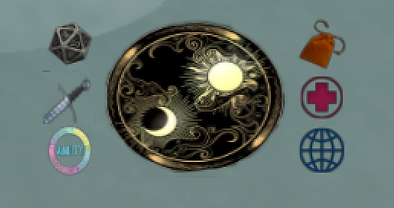
HUD Buttons:
Center (sim logo):
Center Logo opens the character menu, from here you can utilize the following features:
-
Create a character: First step in a new adventure!
-
Titler color: to change titler color it uses LSL format (<0.000, 0.000, 0.000>)
-
Titler text: This is your space to describe your scent/features/mood/whatever.
-
Retire a character ** When you retire a character, you lose all inventory**
-
Character Sheet: Shows your stats in a private local chat.
-
Select Character: To swap between characters
-
Teleport about the sim: This will offer you a few teleport selections for the sim.
Top left (dice):
The Dice menu has the following features:
-
Flat Roll: Rolls 1d20.
-
RP: Rolls against a selected Player.
-
Combat Rolls damaging roll against selected Player.
-
Heal rolls (which have a 50/50 chance of healing 1 HP) ** there are specific rules for Healers in combat please review**
Middle left (sword):
-
Combat Roll: Quick button for faster access to the combat roll against a selected Player.
Bottom left (rainbow circle/ability):
This allows you to spend ability points during Character Creation. Please note the HUD should prompt you automatically to spend these points.
Top right (coin purse):
This button gives access to HUD driven currency and inventory.
-
Stipend: weekly stipend button you may click to gain currency (this is based off of how many ability points are spent in wealth)
-
Pay: send Currency to another Player
-
Balance: Shows current coin balance in private local chat
-
Supplies: Displays your inventory if you have a Health/Attack/Defense Potion.
Middle right (health):
The cross opens the health menu which allows you to reset or adjust your HP. (for example if you are injured outside of combat and wish to remove a HP or two).
Bottom right (web):
Here you can access both the Rizali website and the GPHUD website. You should have access to view all your character information in detail in the GPHUD website.
**Note:** HUD functionality- This HUD is sim-experience driven, which means when you first are prompted, it will require you to allow the experience via a popup. This experience also means you will be able to utilize sim teleporters as they become available. The HUD will eventually auto-attach along with the titler, but until then, there are HUD givers (pillars with crystals) located in the landing zone, the long hall in the viking village, and at the entrance to the city.
**If you have any issues with the HUD or any errors, the first two forms of trouble shooting are to use /1reboot in local chat, which refreshes your HUD, or to relog. If neither of these work, please let an admin know so it can be checked out!**
Character Setup
Upon attaching the HUD the first time or clicking Create Character, the first thing the HUD will prompt is to name the character. Please use your character's name, do not include any titles. For example, the name “June” is acceptable, as is “June Green” with a last name, or “Junie” as a nickname are also acceptable, but “Lady June,” “Princess June Green” etc are NOT acceptable.
Next, you will be prompted to spend your ability points. If you are not sure yet, just hit ignore. It will prompt again as soon as you log into the sim the next time, or you can click the Ability button to raise the prompt again.
That’s it! You do not have to select a race or a class for character creation.
It is also worth noting that at this time, factions are NOT a part of the HUD, but if you wish to include your faction in your titler you are welcome to do so!
Ability Points
All players start with 5 ability points, and there are three stats that you may put these points in:
Attack: Increases the attack bias for dice rolls.
Defense: Increases the defense bias for dice rolls.
Wealth: This one is ONLY useful if you put 4 or 5 ability points into it! If you put 4 or 5 points into Wealth, it increases your weekly stipend significantly!
**NOTE** If you wish to reallocate your ability points, please contact an admin!
Currency
All base coinage is in coppers, and it’s about equivalent to say that 1 copper = 1 dollar.
100 copper = 1 silver
10 silver (1000 copper) = 1 gold
The HUD will grant all new players 350 copper (it will display as 3 silver, 50 copper) and the base weekly stipend is 100 copper (1 silver).
Wealth stat Points offer the following stipend:
0 points: 100 copper a week
1 point: 200 copper
2 points: 300 copper
3 points: 400 copper
4 points: 500 copper
5 points: 600 copper
Inventory/Supplies
Presently speaking there are 5 different potions you may purchase with Hud Currency that will be available in your HUD Supplies. These affect your stats when consumed. Potions may also be given to another player or destroyed from inventory.
Divine Touch: Heals 1 HP ONLY (if used in combat is used in lieu of ones attack turn). 5 silver
Lesser Shield Wall: Boosts defense bias by +1 for 8 hours.+ 1hp :: 2 silver +2hp :: 4 silver
Greater Shield Wall: Boosts defense bias by +2 for 8 hours. 1hp :: 2 silver +2hp :: 4 silver
Lesser Berserker: Boosts attack bias by +1 for 8 hours. +1hp :: 2 silver +2hp :: 4 silver
Greater Berserker: Boosts attack bias by +2 for 8 hours +1hp :: 2 silver +2hp :: 4 silver
The potions can also be used as rewards for involvement or as tournament wins.
• Who can sell them?
-Faction Leads
-Potentially Scholars


